I've been having all kinds of fun lately with Kubernetes, exploring building my own Kubernetes Cluster on the metal, as well as using a managed Kubernetes cluster in Azure with AKS.
Today at the Connect() conference in NYC I was happy to announce Visual Studio Connected Environment. How would one take the best of Visual Studio and the best of managed Kubernetes and create something useful for development teams?
Ecosystem momentum behind containers is amazing right now with support for containers across clouds, operating systems, and development platforms. Additionally, while microservices as an architectural pattern has been around for years, more and more developers are discovering the advantages every day.
You can check out videos of the Connect() conference at https://www.microsoft.com/connectevent, but you should check out my practice video where I show a live demo of Kubernetes in Visual Studio:
The buzzword "cloud native" is thrown around a lot. It's a meaningful term, though, as it means "architecture with the cloud in mind." Applications that are cloud-native should consider these challenges:
- Connecting to and leveraging cloud services
- Use the right cloud services for your app, don't roll your own DB, Auth, Discovery, etc.
- Dealing with complexity and staying cognizant of changes
- Stubbing out copies of services can increase complexity and hide issues when your chain of invocations grows. K.I.S.S.
- Setting up and managing infrastructure and dealing with changing pre-requisites
- Even though you may have moved to containers for production, is your dev environment as representative of prod as possible?
- Establishing consistent, common environments
- Setting up private environments can be challenging, and it gets messier when you need to manage your local env, your team dev, staging, and ultimately prod.
- Adopting best practices such as service discovery and secrets management
- Keep secrets out of code, this is a solved problem. Service discovery and lookup should be straightforward and reliable in all environments.
A lot of this reminds us to use established and mature best practices, and avoid re-inventing the wheel when one already exists.
The announcements at Connect() are pretty cool because they're extending both VS and the Azure cloud to work like devs work AND like devops works. They're extending the developers’ IDE/editor experience into the cloud with services built on top of the container orchestration capabilities of Kubernetes on Azure. Visual Studio, VS Code and Visual Studio for Mac AND and through a CLI (command line interface) - they'll initially support .NET Core, node.js and Java on Linux. As Azure adds more support for Windows containers in Kubernetes, they'll enable .NET Full Framework applications. Given the state of Windows containers support in the platform, the initial focus is on green field development scenarios but lift-shift and modernize will come later.
It took me a moment to get my head around it (be sure to watch the video!) but it's pretty amazing. Your team has a shared development environments with your containers living in, and managed by Kubernetes. However, you also have your local development machine which then can reserve its own spaces for those services and containers that you're working on. You won't break the team with the work you're doing, but you'll be able to see how your services work and interact in an environment that is close to how it will look in production.
PLUS, you can F5 debug from Visual Studio or Visual Studio Code and debug, live in the cloud, in Kubernetes, as fast as you could locally.
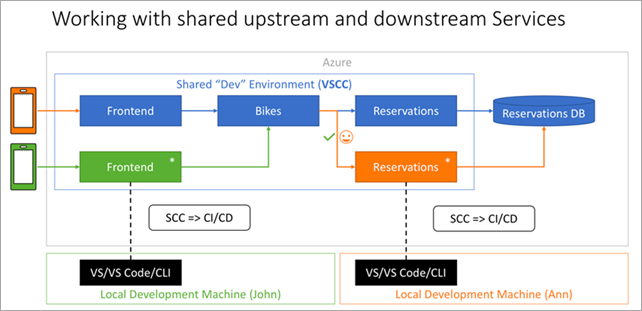
This positions Kubernetes as the underlayment for your containers, with the backplane managed by Azure/AKS, and the development experience behaving the way it always has. You use Visual Studio, or Visual Studio code, or the command line, and you use the languages and platforms that you prefer. In the demo I switch between .NET Core/C# and Node, VS and VSCode, no problem.
I, for one, look forward to our containerized future, and I hope you check it out as well!
You can sign up for the preview at http://aka.ms/signup-vsce
Sponsor: Why miss out on version controlling your database? It’s easier than you think because SQL Source Control connects your database to the same version control tools you use for applications. Find out how.
© 2017 Scott Hanselman. All rights reserved.


from Scott Hanselman's Blog http://feeds.hanselman.com/~/492935908/0/scotthanselman~Announcing-Visual-Studio-and-Kubernetes-%e2%80%93-Visual-Studio-Connected-Environment.aspx
Comments
Post a Comment