Scripts to remove old .NET Core SDKs

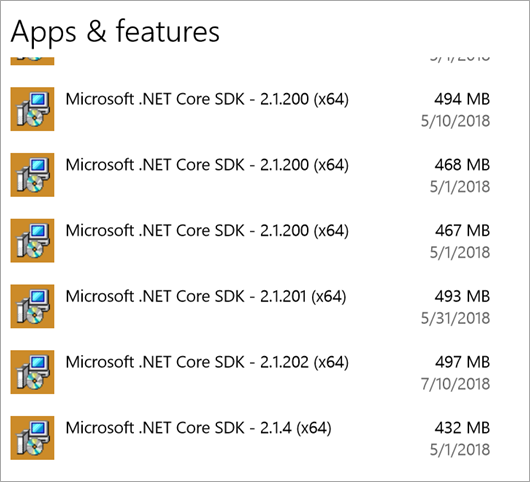
That's a lot of .NET Core installations.NET Core is lovely. It's usage is skyrocketing, it's open source, and .NET Core 2.1 has some amazing performance improvements. Just upgrading from 2.0 to 2.1 gave Bing a 34% performance boost.

However, for those of us who are installing multiple .NET Core SDKs side by side have noticed that they add-up if you are installing daily builds or very often. As of 2.x, .NET Core doesn't yet have an "uninstall all" or "uninstall all previews" option. There will be work done in .NET Core 3.0 that will mitigate this cumulative effect when you have lots of installers.

If you're taking dailies and it's time to tidy up, the short answer per Damian Edwards is "Delete them all, then nuke the dotnet folder in program files, then install the latest version."

Here's a PowerShell Script you can run on Windows as admin that will aggressively uninstall .NET Core SDKs.

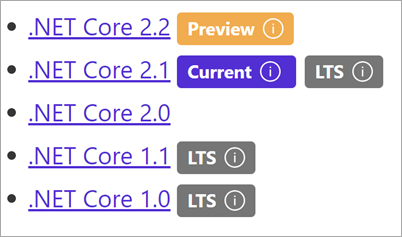
Note the match at the top. Depending on your goals, you might want to change it to "Microsoft .NET Core SDK 2.1" or just "Microsoft .NET Core SDK 2."

Once it's all removed, then add the latest from https://www.microsoft.com/net/download/archives
A list of .NET Core SDKs

Here's the script, which is an improvement on Andrew's comment here. You can improve it as it's on GitHub here https://github.com/shanselman/RemoveDotNetCoreSDKInstallers. This scripts currently requires you to hit YES as the MSIs elevate. It doesn't work right then you try /passive as a switch. I'm interesting if you can get a "torch all Core SDK installers and install LTS and Current" script working.

$app = Get-WmiObject -Class Win32_Product | Where-Object { 
    $_.Name -match "Microsoft .NET Core SDK" 
}
Write-Host $app.Name 
Write-Host $app.IdentifyingNumber
pushd $env:SYSTEMROOT\System32
$app.identifyingnumber |% { Start-Process msiexec -wait -ArgumentList "/x $_" }
popd

This PowerShell is Windows-only, of course.

If you're on RHEL, Ubuntu/Debian, there are scripts here to try out https://github.com/dotnet/cli/tree/master/scripts/obtain/uninstall

Let me know if this script works for you.


Sponsor: Copy: Rider 2018.2 is here! Publishing to IIS, Docker support in the debugger, built-in spell checking, MacBook Touch Bar support, full C# 7.3 support, advanced Unity support, and more.


© 2018 Scott Hanselman. All rights reserved.


from Scott Hanselman's Blog http://feeds.hanselman.com/~/571134816/0/scotthanselman~Scripts-to-remove-old-NET-Core-SDKs.aspx

Comments

Popular posts from this blog

Rail Fence Cipher Program in C and C++[Encryption & Decryption]

Here you will get rail fence cipher program in C and C++ for encryption and decryption. It is a kind of transposition cipher which is also known as zigzag cipher. Below is an example. Here Key = 3. For encryption we write the message diagonally in zigzag form in a matrix having total rows = key and total columns = message length. Then read the matrix row wise horizontally to get encrypted message. Rail Fence Cipher Program in C #include<stdio.h> #include<string.h> void encryptMsg(char msg[], int key){ int msgLen = strlen(msg), i, j, k = -1, row = 0, col = 0; char railMatrix[key][msgLen]; for(i = 0; i < key; ++i) for(j = 0; j < msgLen; ++j) railMatrix[i][j] = '\n'; for(i = 0; i < msgLen; ++i){ railMatrix[row][col++] = msg[i]; if(row == 0 || row == key-1) k= k * (-1); row = row + k; } printf("\nEncrypted Message: "); for(i = 0; i < key; ++i) f...

Data Encryption Standard (DES) Algorithm

Data Encryption Standard is a symmetric-key algorithm for the encrypting the data. It comes under block cipher algorithm which follows Feistel structure. Here is the block diagram of Data Encryption Standard. Fig1: DES Algorithm Block Diagram [Image Source: Cryptography and Network Security Principles and Practices 4 th Ed by William Stallings] Explanation for above diagram: Each character of plain text converted into binary format. Every time we take 64 bits from that and give as input to DES algorithm, then it processed through 16 rounds and then converted to cipher text. Initial Permutation: 64 bit plain text goes under initial permutation and then given to round 1. Since initial permutation step receiving 64 bits, it contains an 1×64 matrix which contains numbers from 1 to 64 but in shuffled order. After that, we arrange our original 64 bit text in the order mentioned in that matrix. [You can see the matrix in below code] After initial permutation, 64 bit text passed throug...

Experimental: Reducing the size of .NET Core applications with Mono's Linker

The .NET team has built a linker to reduce the size of .NET Core applications. It is built on top of the excellent and battle-tested mono linker . The Xamarin tools also use this linker so it makes sense to try it out and perhaps use it everywhere! "In trivial cases, the linker can reduce the size of applications by 50%. The size wins may be more favorable or more moderate for larger applications. The linker removes code in your application and dependent libraries that are not reached by any code paths. It is effectively an application-specific dead code analysis ." - Using the .NET IL Linker I recently updated a 15 year old .NET 1.1 application to cross-platform .NET Core 2.0 so I thought I'd try this experimental linker on it and see the results. The linker is a tool one can use to only ship the minimal possible IL code and metadata that a set of programs might require to run as opposed to the full libraries. It is used by the various Xamarin products to extract...