
Python Insertion Sort

Here you’ll learn about Python insertion sort algorithm.

In terms of performance Insertion sort is not the best sorting algorithm. But it is little bit more efficient then the Selection sort and Bubble sort.

To understand the Insertion Sort algorithm easily, we’ll start with an example.

Also Read: Python Selection Sort

Python Insertion Sort

Example

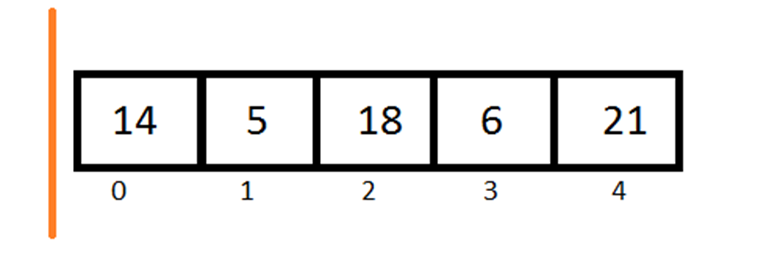
Let’s say we have an array [14,5,18,6,21].

Assume that we have two parts in this array first one is sorted and another one is unsorted.
Python Insertion Sort 1

The  sorted part of array is in the left of orange line and unsorted part is in the right side.

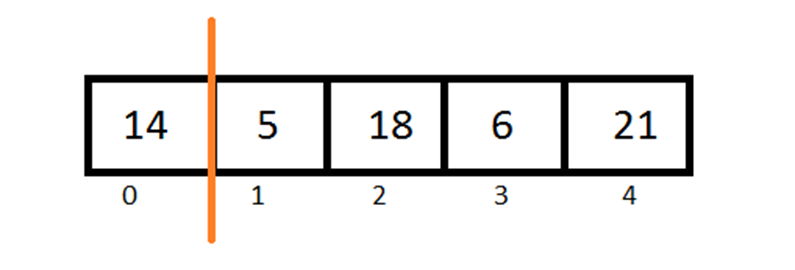
Now all we have to do is pick each element one by one from the unsorted part and add it into the sorted array at its appropriate place.
Python Insertion Sort 2

14 is the only element in our sorted part so it is already sorted.

Now pick the first element from the unsorted part and add it to the sorted part.
Python Insertion Sort 3

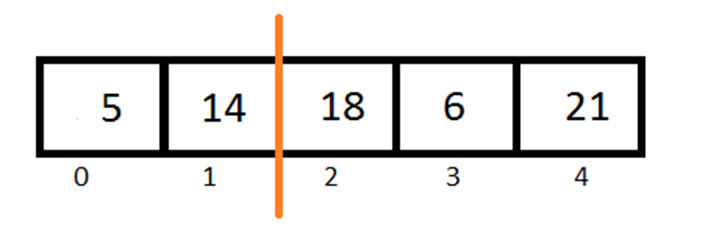
As 5 is less than 14 so 14 have to right shift by one place.

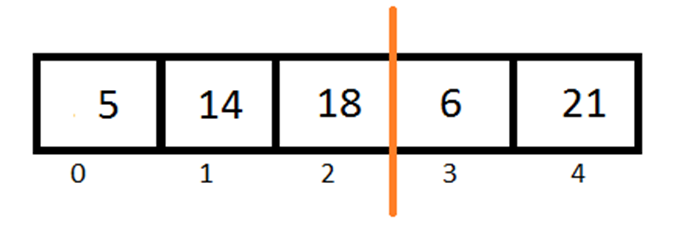
Again pick first element from unsorted part and add it into in sorted part.
Python Insertion Sort 4

18 is greater than 14 and there is no need to shifting.

Repeating same
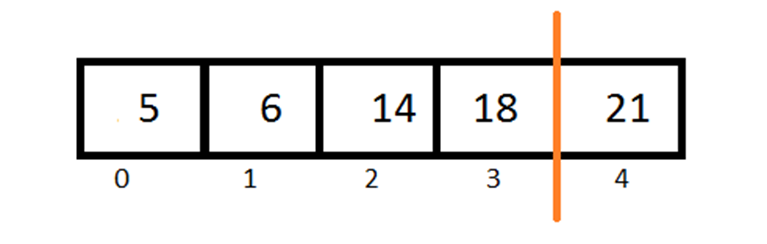
Python Insertion Sort 5

6 is greater than 5 and less than 14.

So we have to right shift 14 and 18 by one place.

At last
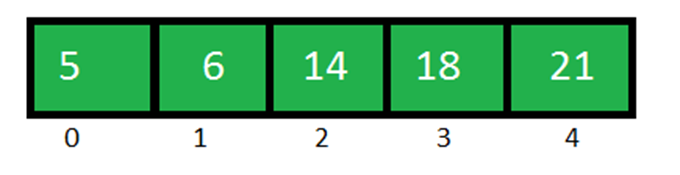
Python Insertion Sort 6

21 is greater than 18 doesn’t need to shift. Done.

Algorithm

We have an array ‘Arr[]’ with n elements

Step 1:  set i = 1

Step 2: set value = Arr[i]

Set position = i

Step3 :  if position > 0 and Arr[position-1]>value

Arr[position] = Arr[position-1]

Position = position -1

[Repeat this step until condition become false]

Step 4: Arr[position] = value

Step 5: goto step 2 for (n-1) times.

Program for Insertion Sort in Python

Arr = [5,14,18,6,21]
n= len(Arr)
i = 1
while (i<=n-1):
  value = Arr[i]
  position = i

  while (position>0 and Arr[position-1]>value):
    Arr[position] = Arr[position-1]
    position = position -1 

  i = i+1       
  Arr[position] = value


for i in Arr:
  print i,

Output

5 6 14 18 21

Comment below if you have any queries related to above python insertion sort algorithm.

The post Python Insertion Sort appeared first on The Crazy Programmer.


from The Crazy Programmer https://www.thecrazyprogrammer.com/2017/11/python-insertion-sort.html

Comments

Popular posts from this blog

Rail Fence Cipher Program in C and C++[Encryption & Decryption]

Here you will get rail fence cipher program in C and C++ for encryption and decryption. It is a kind of transposition cipher which is also known as zigzag cipher. Below is an example. Here Key = 3. For encryption we write the message diagonally in zigzag form in a matrix having total rows = key and total columns = message length. Then read the matrix row wise horizontally to get encrypted message. Rail Fence Cipher Program in C #include<stdio.h> #include<string.h> void encryptMsg(char msg[], int key){ int msgLen = strlen(msg), i, j, k = -1, row = 0, col = 0; char railMatrix[key][msgLen]; for(i = 0; i < key; ++i) for(j = 0; j < msgLen; ++j) railMatrix[i][j] = '\n'; for(i = 0; i < msgLen; ++i){ railMatrix[row][col++] = msg[i]; if(row == 0 || row == key-1) k= k * (-1); row = row + k; } printf("\nEncrypted Message: "); for(i = 0; i < key; ++i) f...

Data Encryption Standard (DES) Algorithm

Data Encryption Standard is a symmetric-key algorithm for the encrypting the data. It comes under block cipher algorithm which follows Feistel structure. Here is the block diagram of Data Encryption Standard. Fig1: DES Algorithm Block Diagram [Image Source: Cryptography and Network Security Principles and Practices 4 th Ed by William Stallings] Explanation for above diagram: Each character of plain text converted into binary format. Every time we take 64 bits from that and give as input to DES algorithm, then it processed through 16 rounds and then converted to cipher text. Initial Permutation: 64 bit plain text goes under initial permutation and then given to round 1. Since initial permutation step receiving 64 bits, it contains an 1×64 matrix which contains numbers from 1 to 64 but in shuffled order. After that, we arrange our original 64 bit text in the order mentioned in that matrix. [You can see the matrix in below code] After initial permutation, 64 bit text passed throug...

Experimental: Reducing the size of .NET Core applications with Mono's Linker

The .NET team has built a linker to reduce the size of .NET Core applications. It is built on top of the excellent and battle-tested mono linker . The Xamarin tools also use this linker so it makes sense to try it out and perhaps use it everywhere! "In trivial cases, the linker can reduce the size of applications by 50%. The size wins may be more favorable or more moderate for larger applications. The linker removes code in your application and dependent libraries that are not reached by any code paths. It is effectively an application-specific dead code analysis ." - Using the .NET IL Linker I recently updated a 15 year old .NET 1.1 application to cross-platform .NET Core 2.0 so I thought I'd try this experimental linker on it and see the results. The linker is a tool one can use to only ship the minimal possible IL code and metadata that a set of programs might require to run as opposed to the full libraries. It is used by the various Xamarin products to extract...