ASP.NET Core didn't have a runtime bundler like previous versions of ASP.NET. This was a bummer as I was a fan. Fortunately Mads Kristensen created one and put it on GitHub, called WebOptimizer.
WebOptimizer - ASP.NET Core middleware for bundling and minification of CSS and JavaScript files at runtime. With full server-side and client-side caching to ensure high performance.
I'll try it out on a default ASP.NET Core 2.0 app.
First, assuming I've installed http://dot.net I'll run
C:\Users\scott\Desktop> cd squishyweb


C:\Users\scott\Desktop\squishyweb> dotnet new mvc

The template "ASP.NET Core Web App (Model-View-Controller)" was created successfully.

This template contains technologies from parties other than Microsoft, see https://aka.ms/template-3pn for details.


SNIP


Restore succeeded.
Then I'll add a reference to the WebOptimizer package. Be sure to check the versioning and pick the one you want, or use the latest.
C:\Users\scott\Desktop\squishyweb> dotnet add package LigerShark.WebOptimizer.Core --version 1.0.178-beta
Add the service in ConfigureServices and add it (I'll do it conditionally, only when in Production) in Configure. Notice I had to put it before UseStaticFiles() because I want it to get the first chance at those requests.
public void ConfigureServices(IServiceCollection services)

{

    services.AddMvc();

    services.AddWebOptimizer();

}


// This method gets called by the runtime. Use this method to configure the HTTP request pipeline.

public void Configure(IApplicationBuilder app, IHostingEnvironment env)

{

    if (env.IsDevelopment())

    {

        app.UseDeveloperExceptionPage();

    }

    else

    {

        app.UseWebOptimizer();

        app.UseExceptionHandler("/Home/Error");

    }


    app.UseStaticFiles();


    app.UseMvc(routes =>

    {

        routes.MapRoute(

            name: "default",

            template: "{controller=Home}/{action=Index}/{id?}");

    });

}
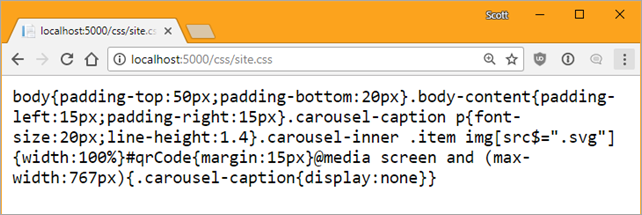
After running "dotnet run" I'll request site.css as an example and see it's automatically minimized:
You can control the pipeline with globbing like this:
public void ConfigureServices(IServiceCollection services)

{

    services.AddMvc();

    services.AddWebOptimizer(pipeline =>

    {

        pipeline.MinifyJsFiles("js/a.js", "js/b.js", "js/c.js");

    });

}
If I wanted to combine some files into an output "file" that'll be held/cached only in memory, I can do that also. To be clear, it'll never touch the disk, it's just a URL. Then I can just refer to it with a <link> within my Razor Page or main Layout.
services.AddWebOptimizer(pipeline =>

{

    pipeline.AddCssBundle("/css/mybundle.css", "css/*.css");

});
WebOptimizer also supports automatic "cache busting" with a ?v= query string created by a TagHelper. It can even compile Scss (Sass) files into CSS. There's plugins for TypeScript, Less, and Markdown too!
WebOptimizer is open source and lives at https://github.com/ligershark/WebOptimizer. Go check it out, kick the tires, and see if it meets your needs! Maybe get involved and make a fix or help with docs! There are already some open issues you could start helping with.
Sponsor: Check out JetBrains Rider: a new cross-platform .NET IDE. Edit, refactor, test and debug ASP.NET, .NET Framework, .NET Core, Xamarin or Unity applications. Learn more and download a 30-day trial!
© 2017 Scott Hanselman. All rights reserved.


from Scott Hanselman's Blog http://feeds.hanselman.com/~/488364984/0/scotthanselman~WebOptimizer-a-Bundler-and-Minifier-for-ASPNET-Core.aspx
Comments
Post a Comment