I'm glad you have a 1080p 60fps accelerated graphics setup, but I'm told school. Impress me with a really nice polished ASCII progress bar or spinner!
I received two tips this week about cool .NET Core ready progress bars so I thought I'd try them out.
ShellProgressBar by Martijn Laarman
This one is super cool. It even supports child progress bars for async stuff happening in parallel! It's very easy to use. I was able to get a nice looking progress bar going in minutes.
static void Main(string[] args)

{

    const int totalTicks = 100;

    var options = new ProgressBarOptions

    {

        ForegroundColor = ConsoleColor.Yellow,

        ForegroundColorDone = ConsoleColor.DarkGreen,

        BackgroundColor = ConsoleColor.DarkGray,

        BackgroundCharacter = '\u2593'

    };

    using (var pbar = new ProgressBar(totalTicks, "Initial message", options))

    {

            pbar.Tick(); //will advance pbar to 1 out of 10.

            //we can also advance and update the progressbar text

            pbar.Tick("Step 2 of 10");

            TickToCompletion(pbar, totalTicks, sleep: 50);

    }

}
Boom.

Be sure to check out the examples for ShellProgressBar, specifically ExampleBase.cs where he has some helper stuff like TickToCompletion() that isn't initially obvious.
Kurukuru by Mayuki Sawatari
Another nice progress system that is in active development for .NET Core (like super active...I can see they updated code an hour ago!) is called Kurukuru. This code is less about progress bars and more about spinners. It's smart about Unicode vs. non-Unicode as there's a lot of cool characters you could use in a Unicode-aware console that make for attractive spinners.
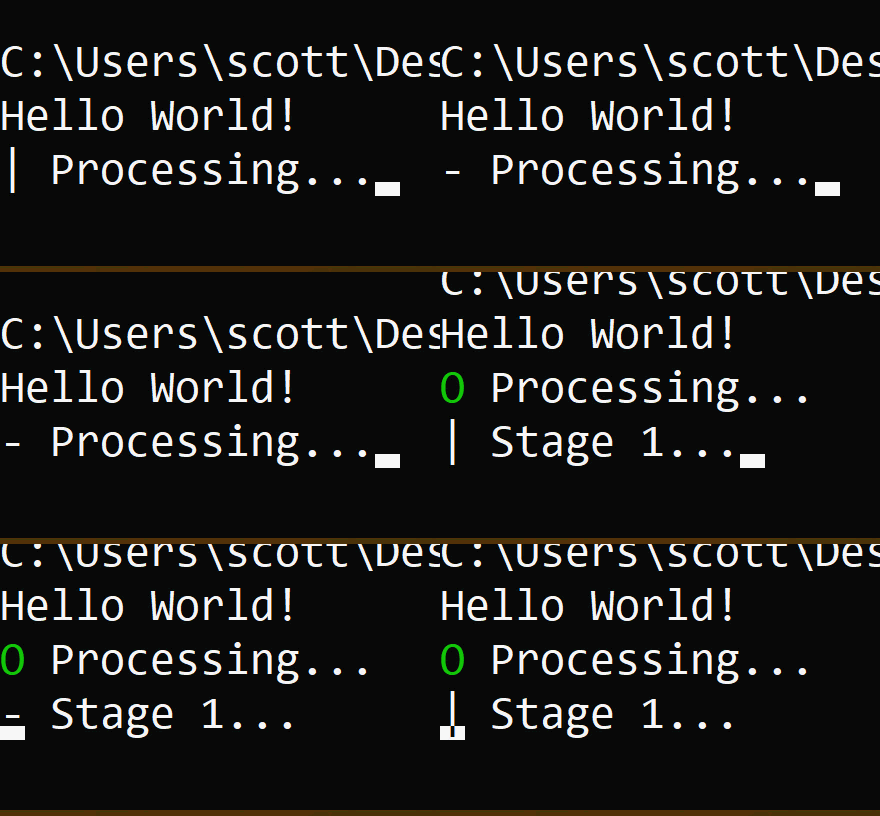
Kurukuru is also super easy to use and integrated into your code. It also uses the "using" disposable pattern in a clever way. Wrap your work and if you throw an exception, it will show a failed spinner.
Spinner.Start("Processing...", () =>

{

    Thread.Sleep(1000 * 3);


    // MEMO: If you want to show as failed, throw a exception here.

    // throw new Exception("Something went wrong!");

});


Spinner.Start("Stage 1...", spinner =>

{

    Thread.Sleep(1000 * 3);

    spinner.Text = "Stage 2...";

    Thread.Sleep(1000 * 3);

    spinner.Fail("Something went wrong!");

});
TIP: If your .NET Core console app wants to use an async Main (like I did) and call Kurukuru's async methods, you'll want to indicate you want to use the latest C# 7.1 features by adding this to your project's *.csproj file:
<PropertyGroup>
    <LangVersion>latest</LangVersion>
</PropertyGroup>
This allowed me to do this:
public static async Task Main(string[] args)

{

    Console.WriteLine("Hello World!");

    await Spinner.StartAsync("Stage 1...", async spinner =>

    {

        await Task.Delay(1000 * 3);

        spinner.Text = "Stage 2...";

        await Task.Delay(1000 * 3);

        spinner.Fail("Something went wrong!");

    });

}
Did I miss some? I'm sure I did. What nice ASCII progress bars and spinners make YOU happy?
And again, as with all Open Source, I encourage you to HELP OUT! I know the authors would appreciate it.
Sponsor: Check out JetBrains Rider: a new cross-platform .NET IDE. Edit, refactor, test and debug ASP.NET, .NET Framework, .NET Core, Xamarin or Unity applications. Learn more and download a 30-day trial!
© 2017 Scott Hanselman. All rights reserved.


from Scott Hanselman's Blog http://feeds.hanselman.com/~/504538858/0/scotthanselman~Accelerated-D-VR-sure-but-impress-me-with-a-nice-ASCII-progress-bar-or-spinner.aspx
Comments
Post a Comment