
iMyFone D-Back iPhone Data Recovery

Our mobile phone is one of the most important device, it has almost all of our crucial data stored in it. Losing the data can be really dreadful. Have you lost your Iphone data due to any accident or something like system crash, forgotten password or stolen or lost data? Well if you have then let me tell you that IMyFone D-back ensures you to get it back. Many a time’s users encounter virus attacks on their phones which makes them lose all their data. Earlier to get that data back was tough but not anymore with the IMyFone D-back. IMyFone D-Back offers four modes of recovery to gain your lost data.

 Following are the Features

  • It offers smart iphone data recovery to the users, and this is the best choice for the users who know even little about technology.
  • It also assures the users to recover the data without any hassle or data theft from all the Iphone, ipad and iPod devices.
  • Recovering back from the iTunes might seem impossible but not anymore, with iMyFone D-back one can recover their iTunes back-up to PC or Mac.
  • With the iMyFone D-back one can even recover their data from the icloud backup without any restoring being required.
  • This supports about 20 plus data types like whatsapp, Wechat and kik, messages and contacts etc.
  • Not only this but it also fix’s various issues the IOS users encounter on a daily basis without any hassle or data loss.

The iMyFone D-back recovers the data in three simple steps which include connection of the device, scan and preview and select and recover the data.

Following is one of the methods which will help you to get your lost data back using the iMyFone D-back.

The very first step is to launch the iMyFone D- Back on your IOS device.

Now, from the smart recovery tab just click on the button start.
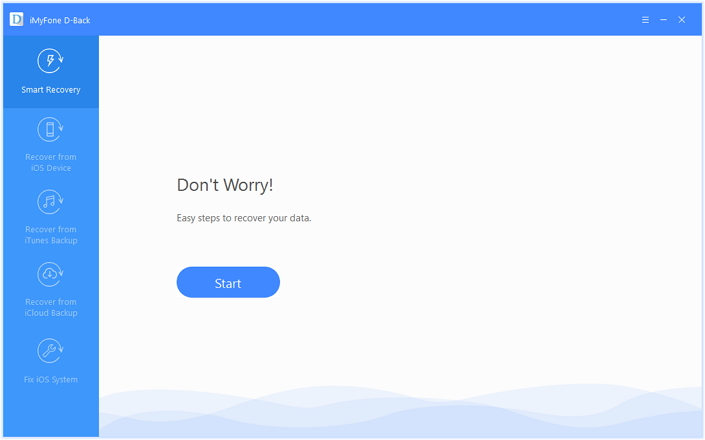
iMyFone D-Back iPhone Data Recovery 1

Choose the option which says about how you lost your data and that will make it easier for subsequent scan or memory.
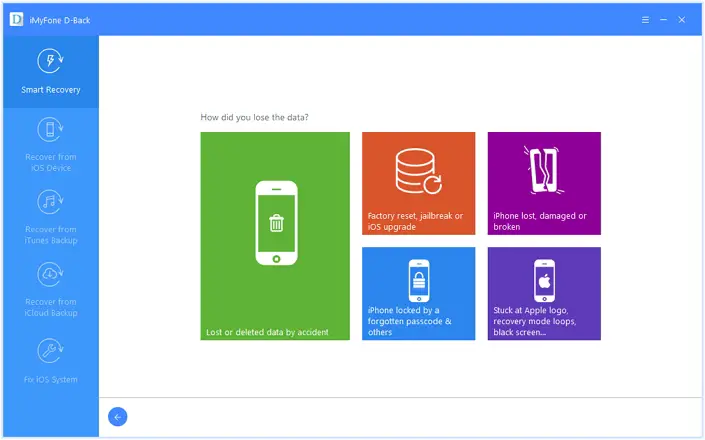
iMyFone D-Back iPhone Data Recovery 2

The last step is just to scan and recover your lost iphones files and the iMyFone D-Back data recovery software will get all your data back.

Final Words

The reviews of the iMyFone D-back are positive; it has helped many people to get their precious data back on their device. With the amazing features it has to offer this is the best option you could try to get your data back.

The iMyFone D-back supports all the devices including iTunes and the latest IOS versions as well.  The best part about this is that the user can even have a free trail before purchase to verify their performance.

They also offer a 100% security to their users as well they give a 30 day money back guarantee which is a win-win option for both.

With easy user interface and no complication in the process of recovery iMyFone D-back is definitely a good choice.

Thank you.

The post iMyFone D-Back iPhone Data Recovery appeared first on The Crazy Programmer.


from The Crazy Programmer https://www.thecrazyprogrammer.com/2017/12/imyfone-d-back-iphone-data-recovery.html

Comments

Popular posts from this blog

Rail Fence Cipher Program in C and C++[Encryption & Decryption]

Here you will get rail fence cipher program in C and C++ for encryption and decryption. It is a kind of transposition cipher which is also known as zigzag cipher. Below is an example. Here Key = 3. For encryption we write the message diagonally in zigzag form in a matrix having total rows = key and total columns = message length. Then read the matrix row wise horizontally to get encrypted message. Rail Fence Cipher Program in C #include<stdio.h> #include<string.h> void encryptMsg(char msg[], int key){ int msgLen = strlen(msg), i, j, k = -1, row = 0, col = 0; char railMatrix[key][msgLen]; for(i = 0; i < key; ++i) for(j = 0; j < msgLen; ++j) railMatrix[i][j] = '\n'; for(i = 0; i < msgLen; ++i){ railMatrix[row][col++] = msg[i]; if(row == 0 || row == key-1) k= k * (-1); row = row + k; } printf("\nEncrypted Message: "); for(i = 0; i < key; ++i) f...

Data Encryption Standard (DES) Algorithm

Data Encryption Standard is a symmetric-key algorithm for the encrypting the data. It comes under block cipher algorithm which follows Feistel structure. Here is the block diagram of Data Encryption Standard. Fig1: DES Algorithm Block Diagram [Image Source: Cryptography and Network Security Principles and Practices 4 th Ed by William Stallings] Explanation for above diagram: Each character of plain text converted into binary format. Every time we take 64 bits from that and give as input to DES algorithm, then it processed through 16 rounds and then converted to cipher text. Initial Permutation: 64 bit plain text goes under initial permutation and then given to round 1. Since initial permutation step receiving 64 bits, it contains an 1×64 matrix which contains numbers from 1 to 64 but in shuffled order. After that, we arrange our original 64 bit text in the order mentioned in that matrix. [You can see the matrix in below code] After initial permutation, 64 bit text passed throug...

Experimental: Reducing the size of .NET Core applications with Mono's Linker

The .NET team has built a linker to reduce the size of .NET Core applications. It is built on top of the excellent and battle-tested mono linker . The Xamarin tools also use this linker so it makes sense to try it out and perhaps use it everywhere! "In trivial cases, the linker can reduce the size of applications by 50%. The size wins may be more favorable or more moderate for larger applications. The linker removes code in your application and dependent libraries that are not reached by any code paths. It is effectively an application-specific dead code analysis ." - Using the .NET IL Linker I recently updated a 15 year old .NET 1.1 application to cross-platform .NET Core 2.0 so I thought I'd try this experimental linker on it and see the results. The linker is a tool one can use to only ship the minimal possible IL code and metadata that a set of programs might require to run as opposed to the full libraries. It is used by the various Xamarin products to extract...