Dependabot for .NET Core dependency tracking in GitHub

Bump Microsoft.ApplicationInsights.AspNetCore from 2.5.0-beta1 to 2.5.0-beta2I've been exploring automated dependency tracking lately. I usually use my podcast's ASP.NET Core website that I host on Github as a guinea pig. I tried Nukeeper and the dotnet outdated global tool - both of which are fantastic and worth exploring.

This week I'm trying Dependbot. I have no relationship with this company. Public repos and personal account repos are free and their pricing is very clear and organization accounts start at just $15 with a free trial.

I'm really impressed with how clever Dependabot is. It's almost like a person in its behavior. Yes, I realize that's kind of the point, but it's no less surprising to see. A well-written bot is a joy to behold.

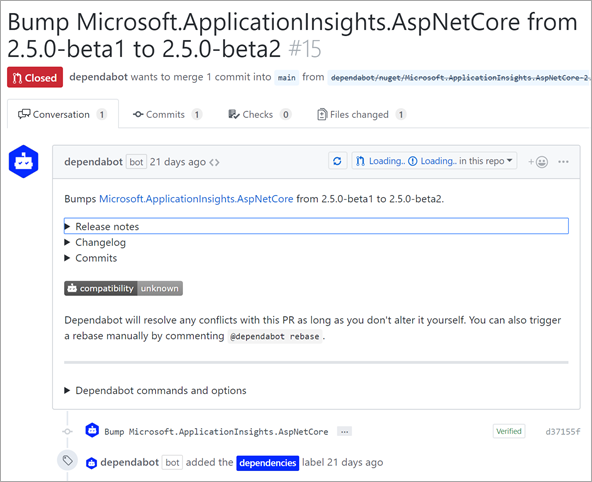
For example, here is a PR (Pull Request) where Dependbot says "Bumps Microsoft.ApplicationInsights.AspNetCore from 2.5.0-beta1 to 2.5.0-beta2."

Basic stuff, right? But that's not all.

It not only does the basics where it noticed that a version bump occurred in a NuGet package, but it also copied the release notes from that NuGet package's release on GitHub! It included links to what was fixed between versions, links to the change logs, AND a complete linked commit list. I mean, that's just lovely.

A few days later, Dependabot went and closed the PR because the dependancy had updated (I was slow) then it commented telling me this PR was superseded by another.
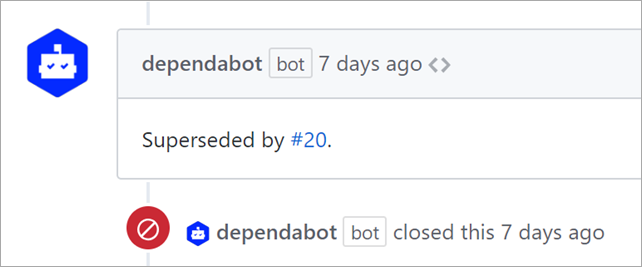
Superseded by #20

Dependabot, like any good bot, also includes commands you can send to it via "Chats" in GitHub PR comments. You can tell it to use specific labels, control milestones. You can also control behavior in the Dependabot Dashboard and have it automerge things like minor versions, or just lock things down to security-only updates.

All in all, it's a very smart bot that supports basically all the languages. .NET support is in Beta, but I haven't had any issues with it. You should definitely check it out. And let me tell you, once you've got everything automated you'll wonder how you ever managed before.


Sponsor: Check out the latest JetBrains Rider with built-in spell checking, enhanced debugger, Docker support, full C# 7.3 support, publishing to IIS and more advanced Unity support.


© 2018 Scott Hanselman. All rights reserved.


from Scott Hanselman's Blog http://feeds.hanselman.com/~/576069664/0/scotthanselman~Dependabot-for-NET-Core-dependency-tracking-in-GitHub.aspx

Comments

Popular posts from this blog

Rail Fence Cipher Program in C and C++[Encryption & Decryption]

Here you will get rail fence cipher program in C and C++ for encryption and decryption. It is a kind of transposition cipher which is also known as zigzag cipher. Below is an example. Here Key = 3. For encryption we write the message diagonally in zigzag form in a matrix having total rows = key and total columns = message length. Then read the matrix row wise horizontally to get encrypted message. Rail Fence Cipher Program in C #include<stdio.h> #include<string.h> void encryptMsg(char msg[], int key){ int msgLen = strlen(msg), i, j, k = -1, row = 0, col = 0; char railMatrix[key][msgLen]; for(i = 0; i < key; ++i) for(j = 0; j < msgLen; ++j) railMatrix[i][j] = '\n'; for(i = 0; i < msgLen; ++i){ railMatrix[row][col++] = msg[i]; if(row == 0 || row == key-1) k= k * (-1); row = row + k; } printf("\nEncrypted Message: "); for(i = 0; i < key; ++i) f...

Data Encryption Standard (DES) Algorithm

Data Encryption Standard is a symmetric-key algorithm for the encrypting the data. It comes under block cipher algorithm which follows Feistel structure. Here is the block diagram of Data Encryption Standard. Fig1: DES Algorithm Block Diagram [Image Source: Cryptography and Network Security Principles and Practices 4 th Ed by William Stallings] Explanation for above diagram: Each character of plain text converted into binary format. Every time we take 64 bits from that and give as input to DES algorithm, then it processed through 16 rounds and then converted to cipher text. Initial Permutation: 64 bit plain text goes under initial permutation and then given to round 1. Since initial permutation step receiving 64 bits, it contains an 1×64 matrix which contains numbers from 1 to 64 but in shuffled order. After that, we arrange our original 64 bit text in the order mentioned in that matrix. [You can see the matrix in below code] After initial permutation, 64 bit text passed throug...

Experimental: Reducing the size of .NET Core applications with Mono's Linker

The .NET team has built a linker to reduce the size of .NET Core applications. It is built on top of the excellent and battle-tested mono linker . The Xamarin tools also use this linker so it makes sense to try it out and perhaps use it everywhere! "In trivial cases, the linker can reduce the size of applications by 50%. The size wins may be more favorable or more moderate for larger applications. The linker removes code in your application and dependent libraries that are not reached by any code paths. It is effectively an application-specific dead code analysis ." - Using the .NET IL Linker I recently updated a 15 year old .NET 1.1 application to cross-platform .NET Core 2.0 so I thought I'd try this experimental linker on it and see the results. The linker is a tool one can use to only ship the minimal possible IL code and metadata that a set of programs might require to run as opposed to the full libraries. It is used by the various Xamarin products to extract...